
Spivi 2.0 – New features and bug-fix release
Today, we released an upgrade to version 2.0 of Spivi Studio, Spivi MetriX and Spivi 365.
We have added some initial features which we’d like to highlight.
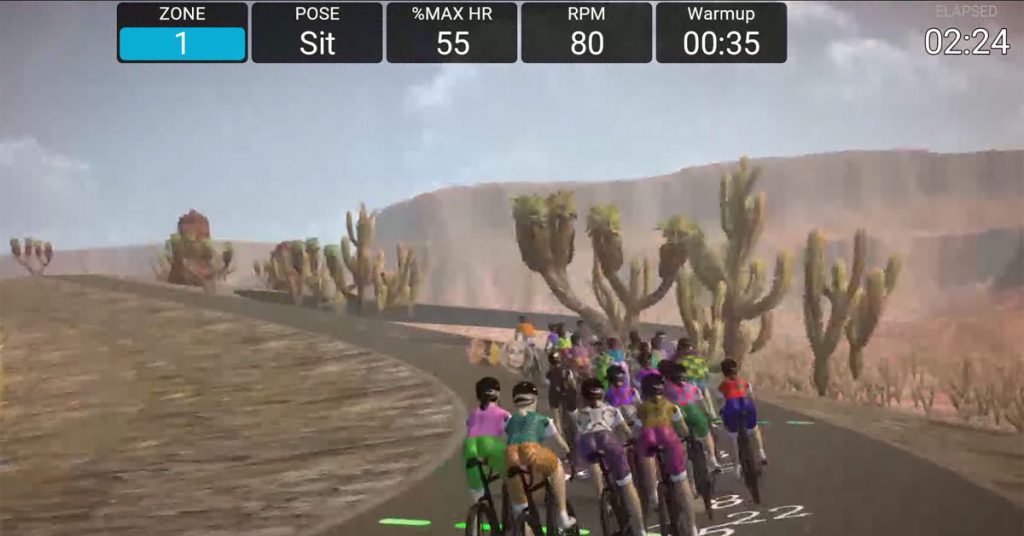
A few changes to note: Workout Elapsed Time added to the top of the screen, Structured Workouts additional values have been added, metric views have been adjusted for overall better readings.
Additionally, the creation of hills and declines (dynamic road) will be coming back along with more sceneries and other features soon, so please stay tuned for that.
Changes made to Spivi 2.0 (rc23)
Please see the following changes that have taken effect.
Dashboard
- Dashboard View: Background is more opaque to allow better reading.
- Workout Elapsed time added, available on top of screen saver.
- Startup View configuration added via System Settings -> Simulation -> Startup View to define the metrics view that will be displayed when the workout begins. The default is none.
- High-speed simulation and motion blur.
Custom Workouts
- Targets are narrowed to 10 units around the instructor target instead of the entire zone
Structured Workouts
- 10 Seconds Countdown added
- Pose indicator added
- Zone change indicator added
- Next goals values added
Challenges
- New icons added for challenges, makes it easier to understand and read which challenge you are running
Color-Coded Views
- Foreground text and overall shape changed to black in order to allow better readings
Post Workout
- Class Summary wrong display data fixed
- The default Cooldown duration changed to 5 minutes. Can be configured on System Settings -> Times -> Cooldown Duration
- Screen Saver command available at the post-workout stage
Avatars
- Fireball removed
- Wheels touching ground fixed